VUV Retention Policy
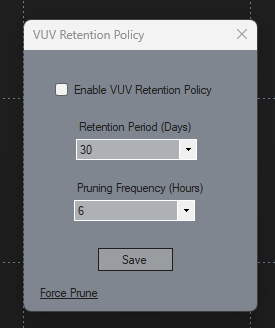
The VUV Retention Policy form allows users to manage and automate the cleanup of older data files stored in the system. It helps ensure efficient use of storage by automatically deleting outdated files based on the retention period specified by the user.
Field Descriptions
Enable VUV Retention Policy
A checkbox to activate or deactivate the retention policy. When unchecked (default), no automatic data cleanup will occur.
Retention Period (Days)
A dropdown menu to specify the number of days to keep data files before they are eligible for deletion. The default value is 30 days.
Retention Frequency (Hours)
A dropdown menu to refine the retention frequency. Every time it prunes, it checks those hours with the last prune time. The default value is 6 hours.
Save Button
Saves the current settings for the retention policy, ensuring they are applied and remembered for future use.
Force Prune Button
Immediately triggers the cleanup process based on the configured retention period, deleting files that exceed the specified age threshold.