Database Backend Migration (v14.1.0)
Starting with version 14.1.0, Skunkworks has introduced support for using a PostgreSQL database instead of flat files for storing results, methods, and instruments data. This enhancement provides improved performance, data integrity, and scalability for your analytical workflows.
Prerequisites
Before upgrading to Skunkworks v14.1.0 or later, you must have PostgreSQL installed and configured on your system. The database backend requires PostgreSQL to function properly.
PostgreSQL Installation
Ensure PostgreSQL is installed and running before proceeding with the Skunkworks upgrade. Consult your system administrator or PostgreSQL documentation for installation instructions specific to your operating system.
Database Migration Process
When you launch Skunkworks for the first time after upgrading to v14.1.0, the system will automatically initiate a migration process to transfer your existing data from flat files to the new database backend. 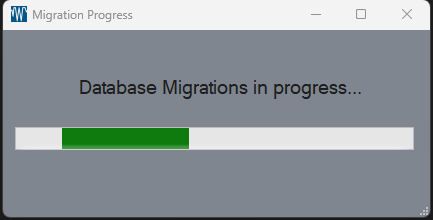
Migration Timeline
Standard Migration: Approximately 5 minutes per 10,000 results
Large Installations: Systems with extensive historical data may require several hours for complete migration
Planning: Schedule your upgrade during a maintenance window to accommodate the migration time
Important Migration Guidelines
⚠️ Critical: Do not interrupt the migration process. Closing Skunkworks or shutting down your system during migration could result in incomplete data transfer and potential data loss.
The migration will transfer the following data types:
Historical results data
Method configurations
Instrument settings and calibrations
Migration Status
During the migration process, Skunkworks will display progress indicators to keep you informed of the current status. The interface will remain responsive for monitoring purposes, but avoid making configuration changes until migration is complete.
Benefits of Database Backend
The new database backend provides several advantages over the previous flat file system:
Improved Performance: Faster data retrieval and processing
Enhanced Data Integrity: Better protection against data corruption
Scalability: Support for larger datasets and concurrent users
Backup and Recovery: Leverages PostgreSQL's robust backup capabilities
Post-Migration
Once the migration is complete, Skunkworks will operate normally with all your historical data now stored in the PostgreSQL database. Your existing workflows and configurations will remain unchanged, but will benefit from the improved performance and reliability of the database backend.
Troubleshooting
If you encounter issues during migration:
Verify PostgreSQL is running and accessible
Ensure sufficient disk space for the database
Check system logs for detailed error messages
Contact technical support if migration fails or appears to hang