Test Panel
The main interface for managing and testing various device settings and parameters.
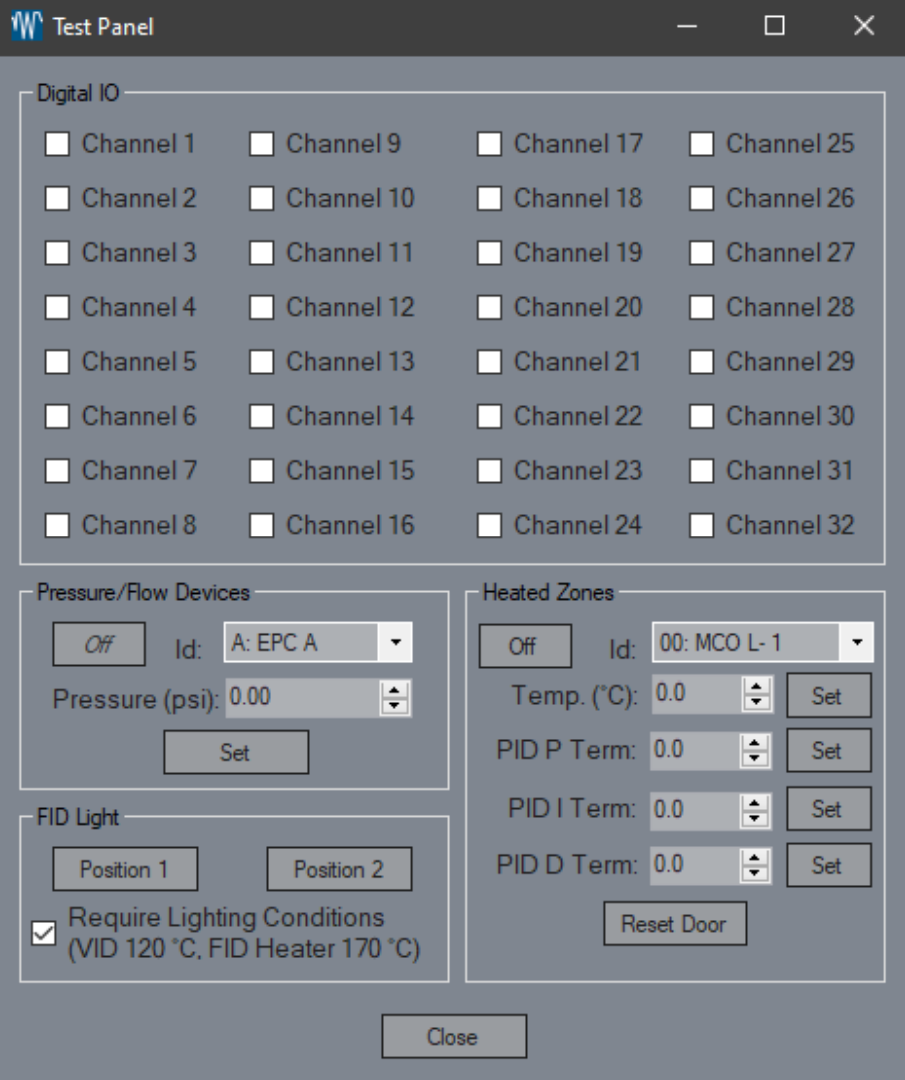
Digital IO Channels
Toggle the digital IO channels on or off with a simple check or uncheck. Control your device like a pro!Pressure/Flow Devices Set
Ready to dial it in? Set your selected device to the desired setpoint for precise control.Pressure/Flow Devices Off
Need a breather? Set your selected device to 0 while keeping the current setpoint, maintaining your configurations without disruption.FID Light Position 1/2
Illuminate your work! This feature attempts to light the selected FID for optimal performance.Require Lighting Conditions
Ensure everything's just right! This option checks that heaters are at temperature and flows are active before lighting the FID, ensuring safe operations.Heated Zone Temperature Set
Set the stage by adjusting the selected heater’s setpoint to your specified temperature, keeping your processes on track.Heated Zone Off
Turn down the heat! Set the selected heater’s setpoint to 0 while preserving the current setpoint for future use.Heated Zone PID Term Set
Fine-tune your heater with this feature, setting the PID values to achieve optimal control and response.Reset Door
Got an MCO? This option re-zeroes the heater door, ensuring accurate measurements and operations.