Rename Discovered Flow Devices
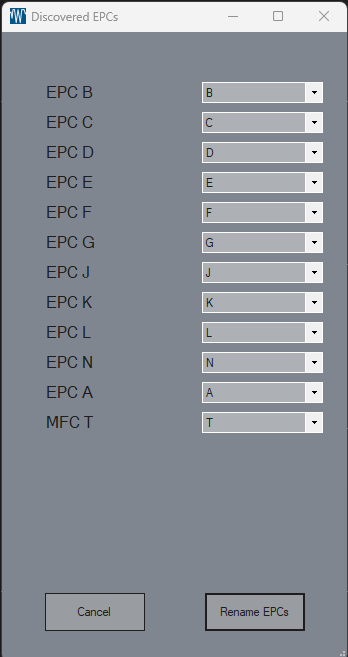
This form allows users to rename EPCs and MFCs discovered by ECv2. Each device is displayed with a label showing its identifier and a dropdown menu to select a new identifier from A to Z.
Features and Components
Device List Display
Label and ComboBox for Each Device: The form dynamically generates a label and a combo box for each discovered device (either EPC or MFC).
Label: Displays the device type (
EPCorMFC) and the device’s current identifier.ComboBox: Allows the user to select a new identifier from
AtoZ. The current identifier of each device is preselected.
Unique Identifier Requirement
The form enforces unique identifiers:
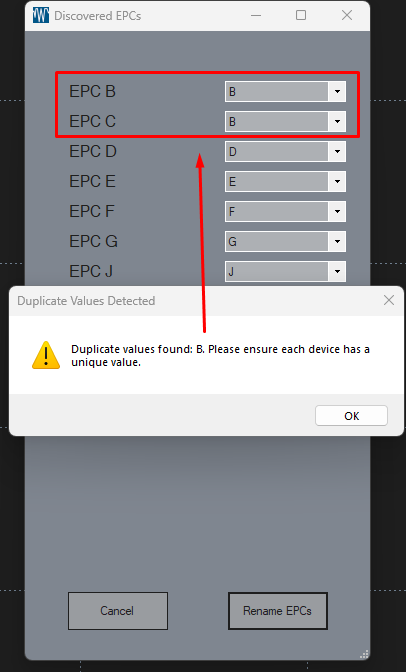
Validation: When the user selects identifiers, the application checks for duplicates.
Warning Message: If duplicate identifiers are selected, a warning message will appear, prompting the user to ensure all identifiers are unique.
Buttons
Cancel: Closes the form without saving any changes.
Rename EPCs: Sends a “Rename” command to ECv2 for each device that has a modified identifier. This action applies only to devices where the identifier was changed.
User Workflow
Review and Edit Identifiers:
The user can review and adjust the identifier of each device in the combo box dropdown list.
Validation:
Upon selecting an identifier, if it results in duplicates, the form will show a warning message.
The user must ensure each device has a unique identifier before proceeding.
Saving Changes:
Once all identifiers are unique, the user can click the Rename EPCs button.
Only devices with updated identifiers will be affected by the “Rename” command.
Canceling Changes:
If the user decides not to apply any changes, they can click Cancel to close the form, discarding any modifications.
Form Resizing and Layout
The form resizes dynamically based on the number of devices listed.
Controls are added programmatically to maintain a consistent layout regardless of the device count, with buttons positioned at the bottom of the form.